
From idea to make
3D Laser Cut House Maker: Create a Miniature Wooden Home
Plan a little house with plenty of personality. Explore house styles, customise the roof, windows and door, then review the cut panels before taking your project to the workshop.
About This Tool
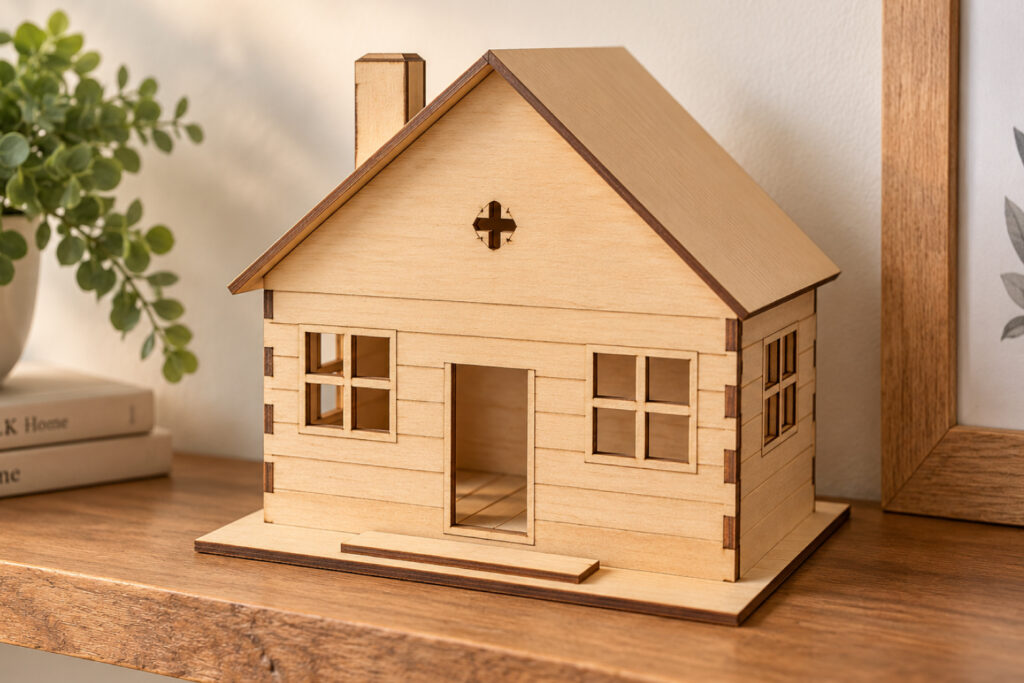
Create charming miniature houses and decorative home projects with the Aqua Artistry Creations 3D House Maker.
This free creative tool is designed for laser crafters who want an easier way to create 3D laser cut house designs without manually drawing every wall, roof, window, door, and decorative element from scratch.
Use the maker to experiment with different house styles and components while building a design that can become beautiful dimensional decor once cut and assembled.
3D wooden houses are perfect for shelf sitters, tiered tray decorations, seasonal villages, personalized gifts, miniature displays, farmhouse decor, Christmas villages and many other laser craft projects.
Whether you’re creating your first miniature laser-cut house or experimenting with a complete village collection, the 3D House Maker gives you a simple starting point for developing your own project.
What Can I Create?
You can use the 3D House Maker for projects such as:
- Miniature wooden houses
- Laser cut shelf sitters
- Farmhouse decorations
- Christmas village houses
- Haunted Halloween houses
- Cottage-style decorations
- Miniature home displays
- Tiered tray decor
- Nursery decorations
- Wedding table decorations
- Personalized family houses
- Housewarming gifts
- Seasonal villages
- Small business craft projects
- Decorative MDF houses
How to Use the 3D House Maker
Step 1 – Start With a House Style
Open the maker and choose a house style or starting design that fits the type of project you want to create.
Think about whether you’re making a simple cottage, farmhouse, traditional home, seasonal house or decorative miniature building.
Step 2 – Customize Your House
Experiment with the available house elements and settings.
Depending on your design, you may work with features such as the walls, roof, windows, doors and decorative details.
Try different combinations until the overall shape suits your project.
Step 3 – Check the Design
Review your house before preparing it for cutting.
Pay particular attention to small details. Very thin sections may be difficult to cut from some materials, especially when the entire house is scaled down.
Step 4 – Choose Your Material and Size
Decide how large you want your finished house to be and which material you’ll use.
Common laser crafting materials include:
- MDF
- Plywood
- Basswood
- Craft wood
- Acrylic
Always consider material thickness when creating dimensional projects.
Step 5 – Prepare Your Cutting File
When you’re happy with your design, use the available download or export option to prepare it for your preferred cutting workflow.
Before cutting, open the design in your laser software and confirm its dimensions.
Step 6 – Cut and Assemble
Cut the required pieces with your laser machine.
Dry-fit the pieces before permanently attaching them. This allows you to identify any positioning or assembly issues before using glue.
Once everything fits correctly, assemble the house and decorate it however you like.
Step 7 – Make It Your Own
Finish your project using paint, stain, engraving, decorative lettering or additional laser-cut elements.
You can also create multiple houses in different sizes and styles to build an entire miniature village.
Frequently Asked Questions
What can I make with this tool?
You can create miniature 3D houses for shelf decor, farmhouse signs, seasonal villages, Christmas decorations, tiered trays, gifts, craft displays and other dimensional laser-cut projects.
Is the 3D House Maker free?
Yes. The Aqua Artistry Creations 3D House Maker is free to use.
What materials can I use?
Many laser crafters use MDF, plywood, basswood, craft wood or laser-compatible acrylic for dimensional projects.
Your ideal material will depend on your laser machine and the size of the finished design.
Can beginners use this tool?
Yes. The maker is intended to simplify the design process so you don’t have to manually construct an entire miniature house in professional vector software.
Can I resize my house?
You can prepare your design according to the size required for your project, but remember that dimensional laser projects depend heavily on material thickness and connection points.
Check the design carefully after resizing.
Can I create a complete miniature village?
Absolutely. One of the fun ways to use the maker is to create several houses with different shapes, sizes and decorative details and arrange them together as a village display.
What can I do with the finished houses?
Paint them, stain them, engrave them, add names or dates, create seasonal collections, or combine them with trees, fences and other miniature laser-cut decorations.
Do I need professional design experience?
No. The purpose of the tool is to give crafters a simpler way to develop dimensional house projects without starting every design from a blank canvas.