
From idea to make
Wedding Card Crafter: Design a Laser Cut Invitation
Create a wedding invitation with personal wording, a decorative border and a layout that suits the celebration. Preview the card and review its production settings before exporting.
About This Tool
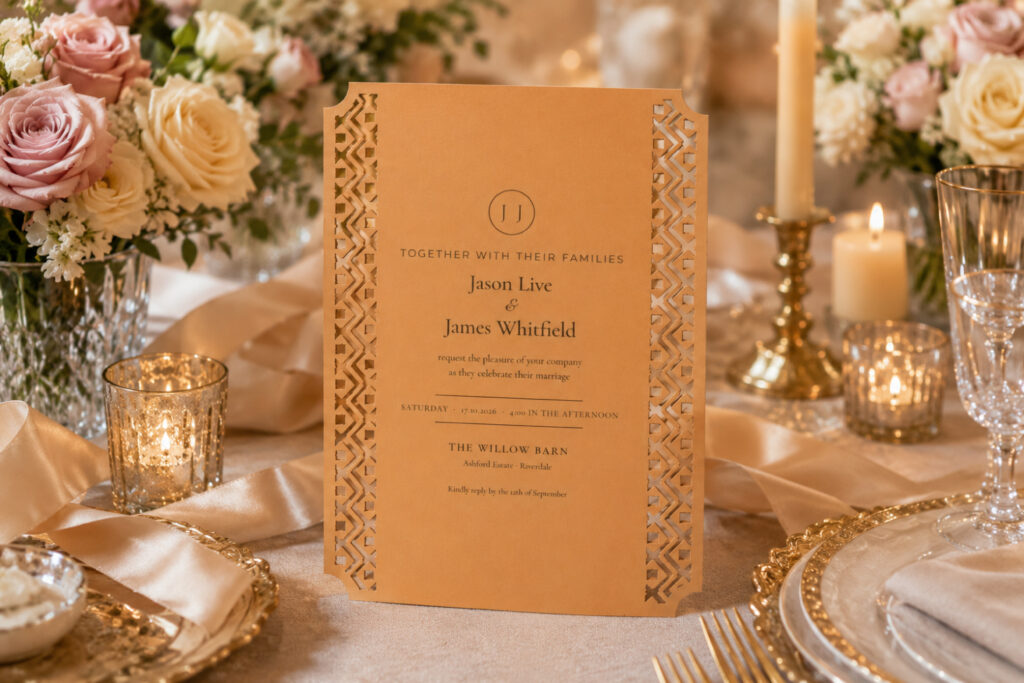
Create elegant handmade invitations with the Aqua Artistry Creations Laser Cut Wedding Card Generator.
This free creative tool helps makers develop laser cut and decorative wedding card designs without having to create every ornamental element manually.
Laser-cut invitations are popular for weddings because detailed cut patterns can turn a simple piece of cardstock into something that feels highly personalized and premium.
Use the generator as a starting point for wedding invitations, engagement cards, anniversary stationery, save-the-date cards and other elegant paper craft projects.
Experiment with decorative layouts and then combine your finished cut design with printed inserts, ribbons, envelopes, names, monograms and wedding colors.
What Can I Create?
Use the Wedding Card Generator for:
- Wedding invitations
- Engagement invitations
- Save-the-date cards
- Anniversary cards
- Bridal shower invitations
- Wedding favor cards
- Reception cards
- RSVP enclosures
- Wedding thank-you cards
- Decorative invitation sleeves
- Personalized paper stationery
- Elegant event invitations
How to Use the Wedding Card Generator
Step 1 – Choose Your Card Style
Start by deciding the overall look of your invitation.
Consider the wedding theme and whether the card should feel:
- Elegant
- Romantic
- Floral
- Minimal
- Modern
- Traditional
- Rustic
- Geometric
Step 2 – Select Your Decorative Design
Explore the available design options and choose a pattern that complements the intended invitation.
For laser cutting, look for a design that remains structurally connected after the unwanted areas are removed.
Step 3 – Customize the Layout
Adjust the available design settings until you’re happy with the overall appearance.
Leave enough usable space for your invitation insert, names or printed wedding details.
Step 4 – Determine Your Card Size
Choose the finished dimensions based on your invitation, envelope and printing requirements.
If you’re making multiple cards, create and test one sample before committing to the complete batch.
Step 5 – Choose Your Material
Cardstock is commonly used for decorative laser-cut invitations.
Consider:
- Thickness
- Color
- Surface finish
- Flexibility
- Cutting performance
Some specialty papers may react differently to laser heat, so always test unfamiliar materials first and confirm they’re laser-safe.
Step 6 – Prepare the Design
Use the available export or download option and check the file in your preferred design or laser software.
Make sure all decorative sections remain connected and remove any unwanted lines before cutting.
Step 7 – Make a Test Card
Cut one sample invitation before producing the complete wedding quantity.
Check the fine details, folding areas, overall size and fit of your printed insert.
Step 8 – Assemble and Decorate
Add your printed invitation and complete the card with coordinating details such as:
- Ribbon
- Belly bands
- Wax seals
- Monograms
- Metallic cardstock
- Decorative envelopes
- Tags
Frequently Asked Questions
What can I make with this tool?
You can create decorative wedding invitations, engagement cards, save-the-date stationery, anniversary cards and other elegant paper projects.
Is the Wedding Card Generator free?
Yes. The Aqua Artistry Creations Laser Cut Wedding Card Generator is free to use.
What type of paper should I use?
Good-quality cardstock is a practical starting point.
The ideal thickness depends on the amount of detail in your design and your cutting machine.
Can I add names and wedding details?
You can combine your decorative design with names, dates, monograms and printed invitation inserts using your normal crafting workflow.
Should I cut all my invitations at once?
No. Always make at least one complete test card first.
This allows you to check the material, dimensions, cutting detail and fit of the insert before creating a large batch.
Can beginners make laser-cut wedding cards?
Yes. Start with relatively simple patterns and avoid extremely narrow decorative areas until you’re familiar with how your selected cardstock cuts.
Can I use different wedding colors?
Absolutely. You can combine a decorative outer card with contrasting inserts, envelopes and accessories that match the wedding color palette.
Can I make invitations for events other than weddings?
Yes. Similar decorative card designs can work for anniversaries, engagements, bridal showers, formal parties and many other special occasions.